Florida Surcharge Tax

Not FL Sadly..
Florida counties have a 0%-2% discretionary sales tax called a surtax. It is on top of the 6% FL sales tax rate and of course, any cities or special sales tax. This one is a bit different, there is a limit for sales of TPP that it applies to the first $5K. However, this one isn’t like that North Dakota first $2,500 or limit of $56.25 sales tax. FL surtax works on an item-by-item basis but with some exemptions about bulk quantity or use of items.
Here’s a link to the FL explanation and law: 21A-006.pdf
I’m not a SALT lawyer, this is not legal or financial advice. Please seek a SALT lawyer if you want legal guidance.
We’ll run through some examples and how Business Central can or cannot support it. The assumptions are Line 1 is Qty 2 at $3,000 each, and Line 2 is Qty 1 at $6,000. We are ignoring FL 6% tax and only dealing with a 1% county surtax.
Also note: The correct answer for my example is $110 of surcharge tax. Just to cut down on some words I will show what that means as an overage/shortage for each option. I’m assuming 50 FL invoices a month with the same variance.
Option #1: Charge Tax Like Normal
In Business Central this would be to put a 1% Tax Jurisdiction for the county.
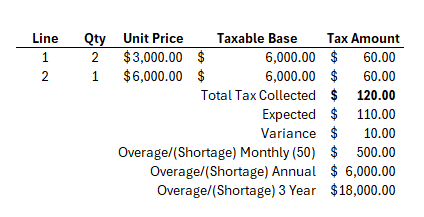
Pro: This is easy, it’s out of box functionality. As long as you remit the full amount you collected to the state, the State doesn’t mind your overpayment.
Con: Your customers most likely would be upset and short pay the tax.
Option #2: Business Central Limit of $5K
In Business Central under Tax Jurisdictions you would add a Maximum Amount of $5K
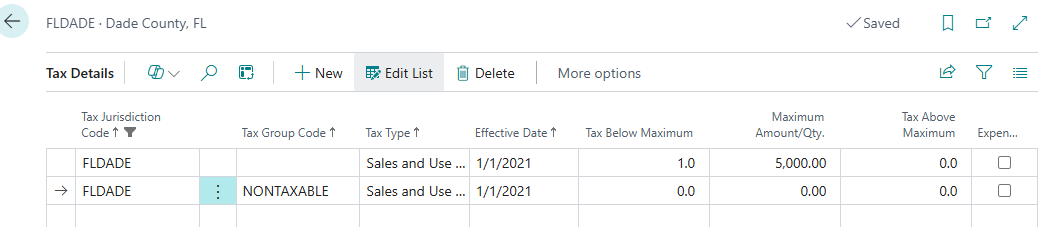
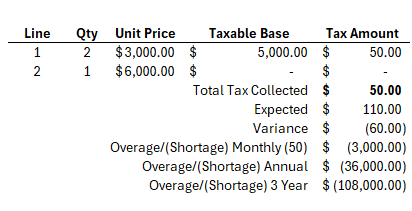
Pro: This is an out of box feature and does technically limit this order. This is how you would do North Dakota.
Con: This is underpaying the tax, by a lot. The formula is only taxing $5K on the full order it’s not caring that this could be a by Qty line and/or taxing by line. It’s just taxing the first $5K.
Also, please don’t do this. This is totally fine for ND as the tax is a full order limit, but this would be very bad for FL.
Option #3: The Actual FL Law Item-by-Item
This is how the rule set actually reads, that each item must be over $5K (please note there’s exceptions to the rule but those would be harder to deal with).
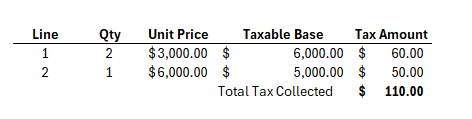
Pro: This is accurate (plus or minus if what you’re selling meets the FL definition of bulk/component sales), you are not over or under paying the State/County. Avalara does do this standard without further setup, however, if you wanted to apply the actual bulk laws you may need to play around.
Con: Easily this is not a setup in Business Central, you can still do this with Option #5. Not to mention, this isn’t really how most customers interpret this rule either, meaning you would still likely get customer push back.
Option #4: How Customers Tend to Interpret This Rule
Most customers tend to think this is in aggregate by line. If you buy 8 of an item, that’s in bulk therefore it meets the FL rule set and you should only be charged for the first $5K. While the FL rule set does have some wiggle room on bulk, buying 8 on one orders doesn’t automatically make this fit the FL rule set.
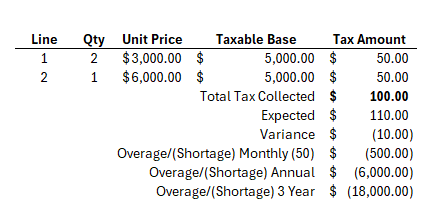
Pro: You’re only paying what tax you collected to the State and your customers are happy. Avalara can do this, not standard feature but you can create a custom rule.
Con: Business Central cannot do this standard, but you could force it using Option #5. You’re also underpaying the tax, leading you open to audit fines/fees and your company paying the back tax.
Option #5: Force Business Central
You could use the BC feature to adjust the tax: Smooth Out Rounding Variances: Easy Adjustments for Tax/VAT in Business Central — Riviezzo Consulting
In this case you would adjust the tax amount to be the correct amount.
Pros: Hopefully would be correct tax with the out of box functionality, and would be a bit easier to adjust for when FL does have additional exceptions.
Con: You would rely on someone entering the order to properly apply these laws and amounts. I.e. this is not automatic. However, I could see someone being able to develop something that might work if something like Avalara (or other tax software that can accommodate this) is not in the cards.

Please note if you are on Avalara and on BC or not, you still can utilize Options #3 standard or you can request in your implementation you want Option #4. Just know if you opt to use #4 your company would be responsible for the miscalculated tax to the State.